Built for small teams that value clarity over complexity

The simple Gantt software built for small teams.

Spot schedule risks earlier and keep your team working from the same plan.

  • Premium is $8/month with unlimited collaborators.
  • See what's blocking delivery.
  • Identify schedule risk earlier.

Free for one project  ·  Premium $8 / month for unlimited users & more projects

Start Planning for Free

No credit card required

Simple Gantt app — Gantt chart project timeline view
★★★★★5 / 5 from early usersFree plan — no credit card requiredCancel anytimeUsed by project managers & small teams
★★★★★

Clean, intuitive interface. Creating tasks and placing them on the timeline is quick and straightforward, without unnecessary steps. I especially liked task dependencies — they make it much easier to organise and prioritise work.

Mateusz K.

Project Manager, SyntraStudio

★★★★★

It focuses on what really matters instead of overwhelming users with unnecessary features. Setting up a project and adding tasks felt very intuitive — there are multiple ways to accomplish the same task depending on your workflow.

Bartosz W.

Student Council Chairman, Faculty of Electrical & Computer Engineering

Built for small teams that value clarity over complexity.

Three steps from signup to a project plan your whole team can follow.

1

Create Your Project in Seconds

Sign up and your first project is already waiting. Add tasks, set dates, and see your whole schedule on a visual timeline — no spreadsheet formulas, no configuration required.

2

Connect Tasks to See What's Blocking Delivery

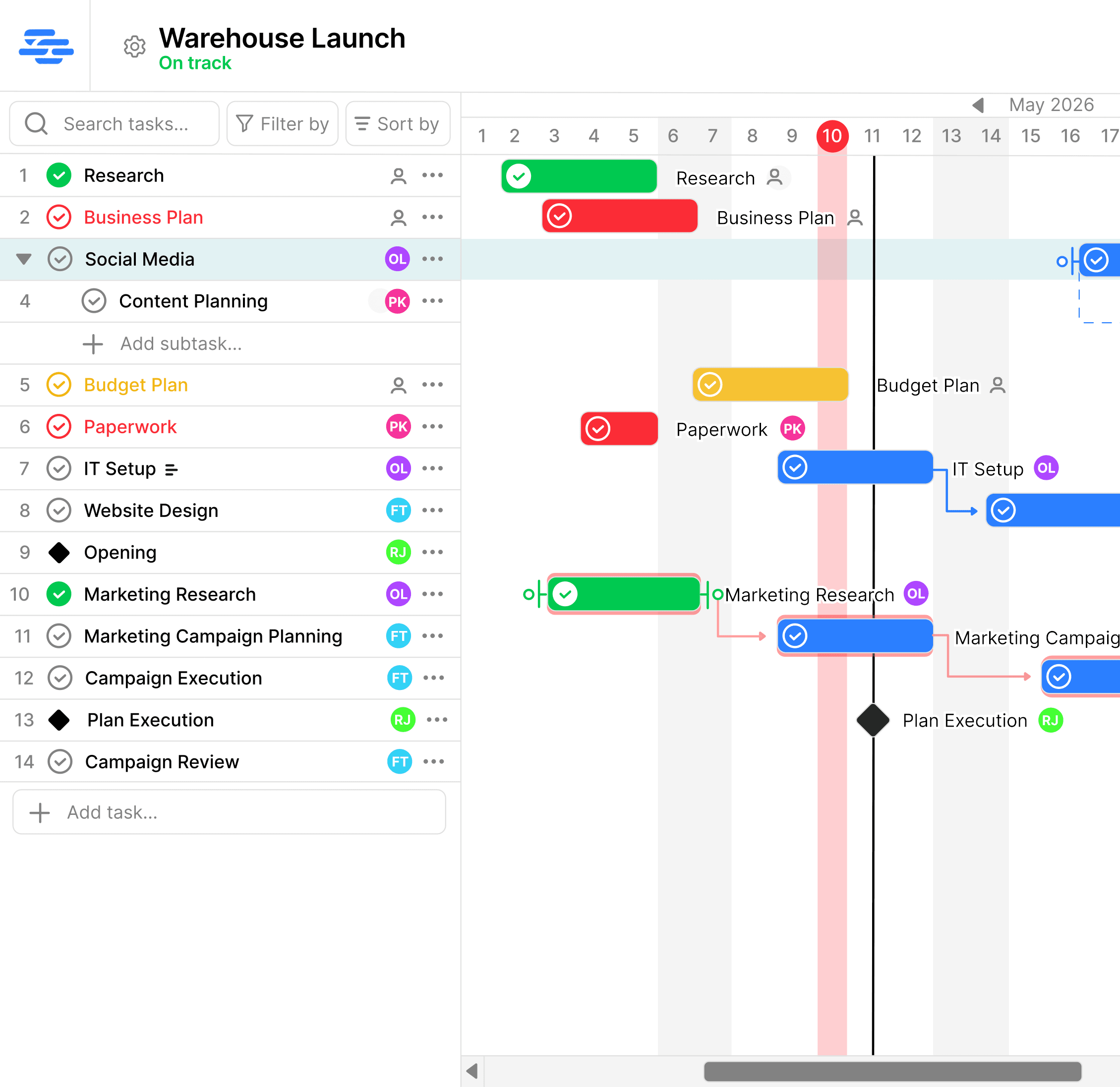
Draw dependency arrows to show what blocks what. If a predecessor slips, the timeline shows which downstream tasks are affected so you can adjust the plan before it becomes a problem.

3

Keep the Team Working from the Same Plan

Drag a task to a new date and status updates automatically. Everyone on the team sees the same live timeline — no spreadsheet to email, no version confusion.

Stop rebuilding project timelines with spreadsheet formulas.

Spreadsheets can be turned into project timelines, but dependencies, schedule risk and changes usually require formulas and ongoing manual maintenance.

Excel / Google Sheets

  • Visual timelines require manual configuration
  • Dependencies must be tracked manually
  • Schedule-risk indicators require custom formulas
  • Changes can be difficult to communicate clearly
  • Multiple versions can create confusion

SimpleGantt

  • Status calculated from task dates — automatically
  • Drag-and-drop visual Gantt timeline
  • Dependency arrows show what's blocking what
  • Everyone sees the same live schedule
  • On Track, At Risk or Delayed — visible at a glance
Try SimpleGantt Free

No credit card required · Free for one project

Everything a small team needs to stay on schedule

Visual scheduling, automatic status and task dependencies — without complicated setup.

Automatic status trackingDeadline visibility

Identify schedule risk earlier

SimpleGantt uses task dates and completion to calculate whether work is On Track, At Risk or Delayed. Your team updates the task; SimpleGantt calculates the schedule status. No manual updates, no status fields to maintain.

Simple Gantt project status overview showing On Track, At Risk, and Delayed tasks for a small team
Task assignmentsFlat-rate team access

Invite everyone without increasing the bill

Assign tasks to teammates and give the whole team visibility into the plan. Premium supports unlimited collaborators at one flat price — your cost stays the same whether you add one person or ten.

Simple Gantt team task assignment — small team collaborating on a shared Gantt chart
Drag-and-drop reschedulingTask dependencies

Update the schedule quickly when priorities change

Drag a task to a new date. Draw a dependency arrow to show what it blocks. When priorities shift, the timeline helps you understand what's affected and keep the plan realistic.

Simple Gantt drag-and-drop scheduling — small team adjusting project timeline

See it in action

Tasks, dependencies, deadlines and automatic status — one clean timeline for your whole team.

Simple pricing. Unlimited teammates.

Start for free and upgrade when you're ready. Bring everyone on board without paying more.

Free

$0forever

Get started with no commitment

  • 1 project
  • Up to 10 users
  • Up to 50 tasks
  • Full Gantt chart
  • Task dependencies & milestones
Get started

Premium

$8/ month

For teams that are growing

  • Up to 20 projects
  • Unlimited users
  • Unlimited tasks
  • Full Gantt chart
  • Task dependencies & milestones
  • Templates
  • Statistics
Start Premium

Enterprise

$75/ month

For organisations at scale

  • Unlimited projects
  • Unlimited users
  • Unlimited tasks
  • Full Gantt chart
  • Task dependencies & milestones
  • Templates & statistics
  • Roles & permissions
  • Multiple project admins
  • Priority support
Start Enterprise
Upgrade only when you need more projectsCancel Premium anytimeYour free project remains available

Frequently asked questions

What small teams ask before switching from spreadsheets or heavier tools.

Is SimpleGantt free for small teams?

Yes. The free plan includes one project, up to 10 users, full Gantt software scheduling, task dependencies and milestones. Most small teams can get started — and stay — on the free plan. Upgrade when you need more projects.

Why is Premium only $8 a month?

SimpleGantt focuses on visual scheduling, dependencies and project status instead of trying to replace every tool your team already uses. That keeps the product focused and lets us offer Premium for one flat monthly price — not per seat.

How does automatic status tracking work?

SimpleGantt uses task dates and completion to calculate whether work is On Track, At Risk or Delayed. Your team updates the task; SimpleGantt calculates the schedule status. On Track means there is enough time remaining. At Risk means less than 20% of scheduled time is left. Delayed means the task end date has passed.

How is SimpleGantt different from other tools?

Many project-management tools increase the price as your team grows. SimpleGantt uses one flat monthly price ($8/month), so you can invite your whole team without calculating the cost of every additional seat.

Why not just use a spreadsheet?

Spreadsheets work for task lists. They can't show visually which tasks depend on others, which deadlines are at risk, or how a date change affects the rest of the project. SimpleGantt gives you that visibility automatically — and everyone on the team sees the same live view.

Why use Gantt software instead of Trello or a to-do list?

Trello and to-do lists tell you what needs doing — not when it's due or whether you'll actually make it. If your team has real deadlines and tasks that depend on each other, Gantt software makes that visible. You see the whole project at a glance, not just today's tasks.

Is it hard to set up?

No. Create an account and your first project is ready instantly. Add your tasks, set start and end dates, and you're scheduling. Most teams have their first project planned in under 5 minutes. No onboarding call, no configuration wizard.

Can small teams manage task dependencies in SimpleGantt?

Yes. Draw dependency arrows between any two tasks to show which work is blocked by other work. When a predecessor slips, the visual timeline shows which downstream tasks are affected — helpful for understanding the knock-on impact before it causes a delay.

Does SimpleGantt work for remote teams?

Yes. The Gantt timeline is shared and live — every team member sees the same schedule, assignments and status. No spreadsheet to email, no Slack updates to chase. Your whole remote team stays on the same page.

Can I cancel anytime?

Yes. Cancel at any time. Your plan stays active until the end of your current billing period with no further charges. Your free project remains available after cancellation.